 Your Name Inbox
IMAP, POP3 and SMTP in plain words
Last reviewed
The quick version
- SMTP sends mail out.
- IMAP and POP3 bring mail in.
- For phone plus laptop, IMAP is usually the better fit.
Why there are three
A protocol is a set of agreed rules. Two computers follow the rules so they understand each other. Email uses a few of them, and each has one job.
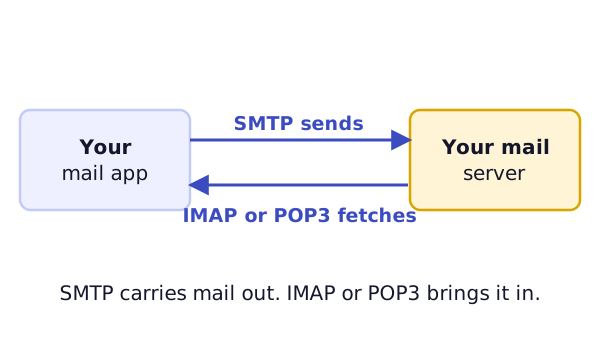
SMTP: sending
The aim of the Simple Mail Transfer Protocol is to transfer mail reliably and efficiently.[1] When you press Send, your app hands the message to a server using SMTP. The server then passes it along.
That's why your mail app asks for an "outgoing" server. It is the SMTP one.
IMAP: reading mail that stays on the server
The Internet Message Access Protocol, or IMAP, lets an app reach and manage messages that sit on a server.[2] Folders on the server act like folders on your own computer.[2]
Here's what that means for you. Read a message on your phone, and your laptop shows it as read. Make a folder on one device, and it appears on the other. The mail itself stays in one place.
POP3: downloading mail
The Post Office Protocol, version 3, is meant for a computer that wants to fetch the mail a server is holding.[3] Normally the mail is downloaded and then deleted from the server.[3] The standard also says it isn't meant for much work on the mail while it's on the server.[3]
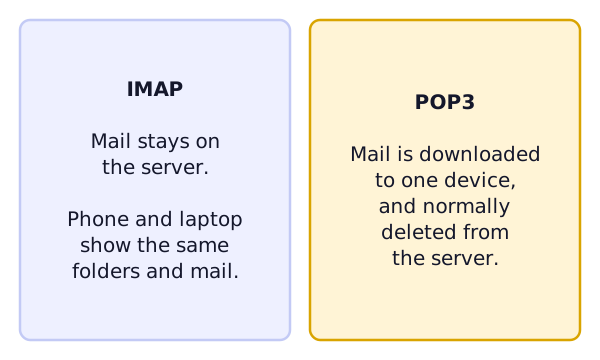
Think about two devices using POP3. If the first one downloads a message and the server deletes it, the second never sees it.[3]
Which should your app use?
Apple's Mail app asks you to choose IMAP or POP for a new account. If you're unsure, Apple says to contact your email provider.[4]
A simple rule helps:
- Phone and laptop both read the same address? Choose IMAP.
- One old computer that keeps every message? POP3 can work. Keep a backup.
Whatever you choose, sending still uses SMTP.
What you'll see in a settings screen
A mail app asks for two servers. The incoming server is the IMAP or POP3 one. The outgoing server is the SMTP one. They often have different names. Your provider lists both.
You may also see words like "SSL" or "port". They describe how the app connects safely. Your provider's help page gives the right values, so copy them exactly.
What's next
Now you know the words. Time to use them. See adding your email to a phone or computer.
Sources
- RFC 5321: Simple Mail Transfer Protocol, IETF (accessed 2026-11-03)
- RFC 3501: Internet Message Access Protocol - Version 4rev1, IETF (accessed 2026-11-03)
- RFC 1939: Post Office Protocol - Version 3, IETF (accessed 2026-11-03)
- Add an email account to your iPhone or iPad, Apple Support (accessed 2026-11-03)